A budgeting app your clients will love. A first plan you start with their numbers already in.
Clients get their own budgeting app, inside the one file you both plan from. You invite in four fields; they enter their household, goals and budget in about five minutes each.
About 2 minutes from you, four fields to invite, then about 5 minutes each for your client's household, goals and budget. Tap through it: these are the app's own screens.
An interactive tour of real app screens. Use the buttons on the phone, or the Next button beside it, to move through it.
Tap here
See it from your side
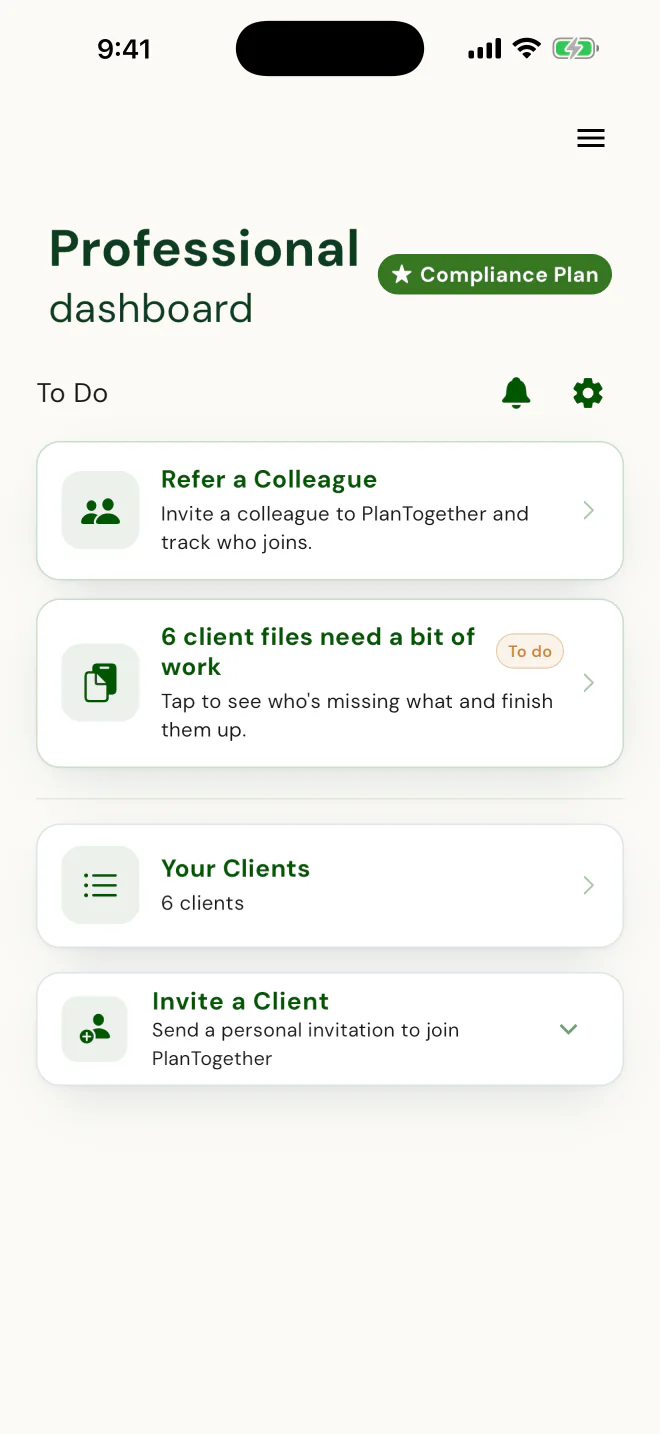
Your dashboard
Your part: four fields and one button.
Invite a Client asks for first name, last name, email and email again. Then open Your Clients to see who has arrived.
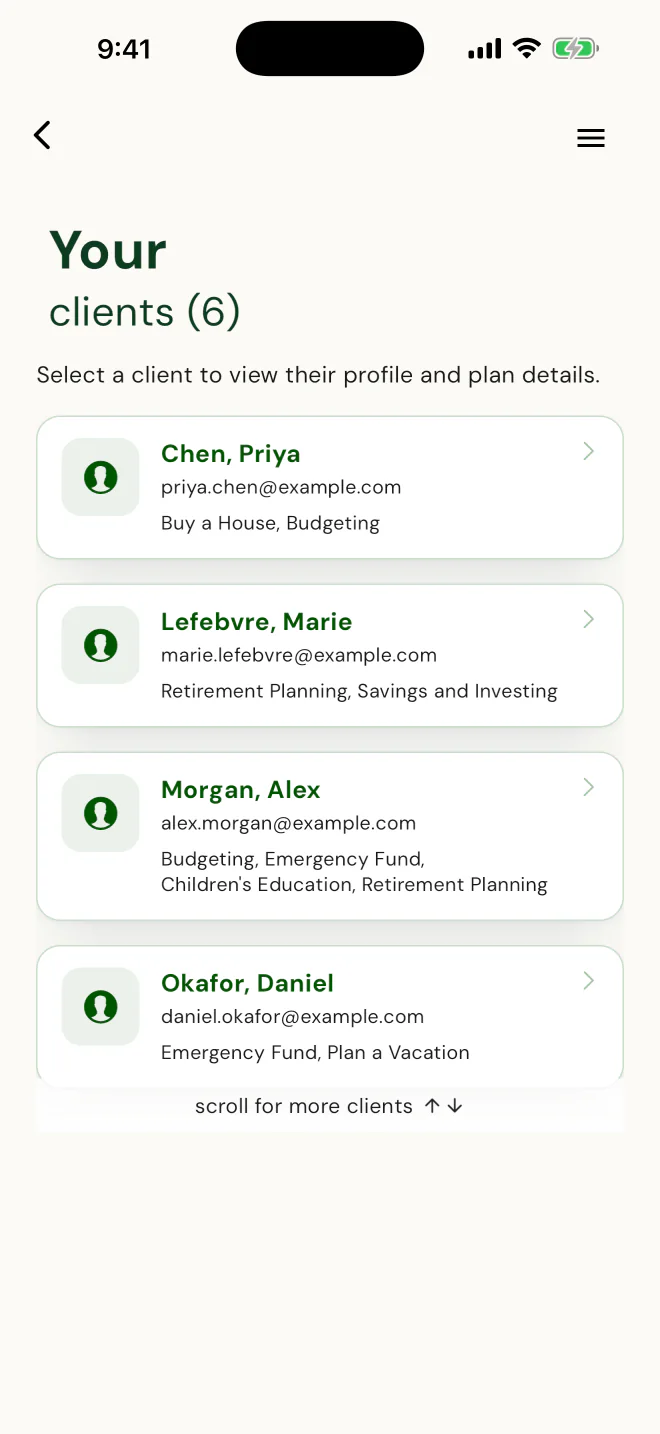
Your clients
They arrive with their goals already picked.
A house, an emergency fund, retirement, the kids' education: each client chose their own from a list. You didn't type any of it.
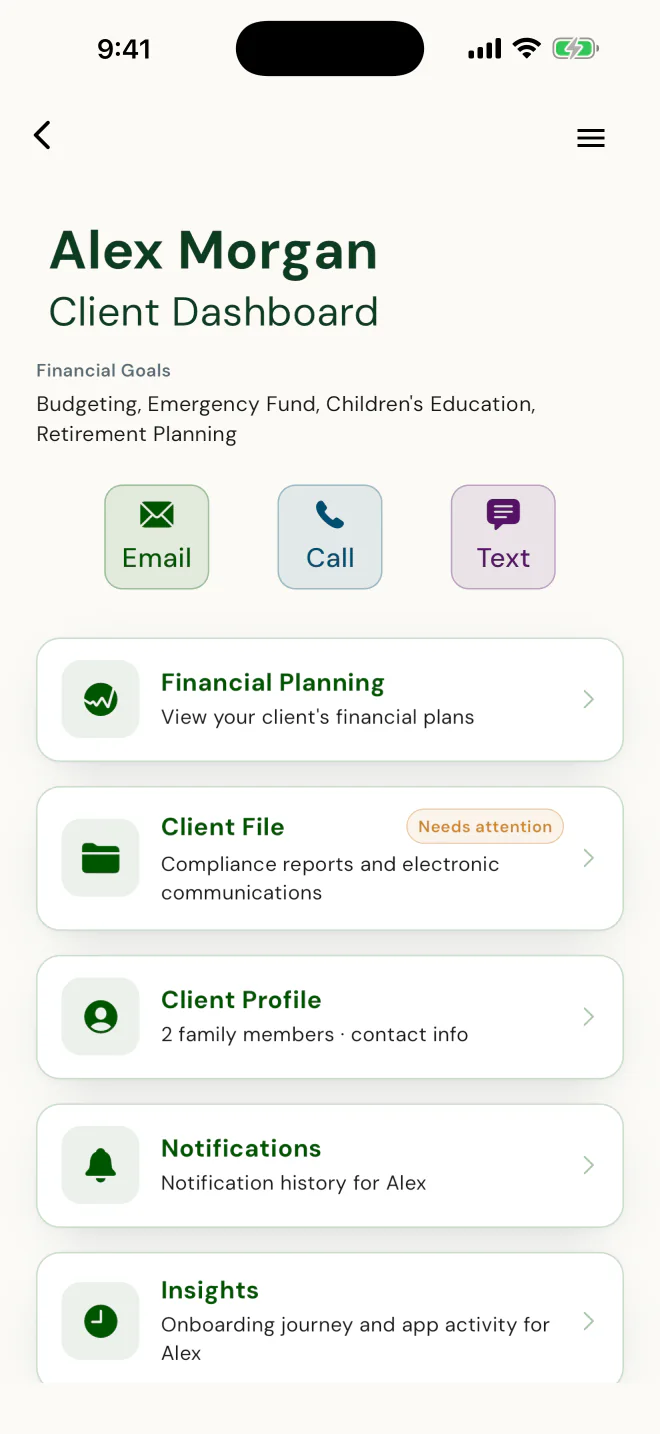
One client file
One client file, and Alex filled it in.
Their goals, profile and budget came in through their own app. The plan is where you come in. Email, call and text are one tap away.
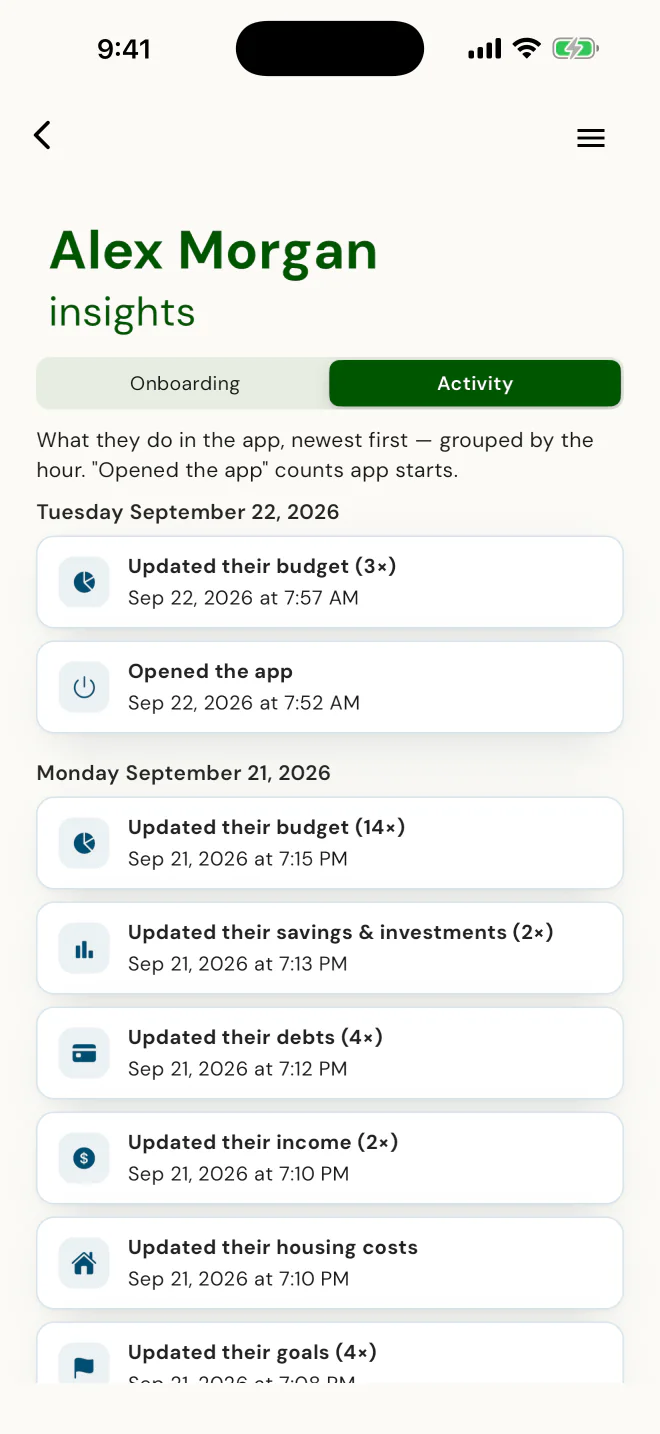
Insights
The setup, done by Alex, not by you.
Household, goals, income, debts, savings and a budget, entered in one sitting, each row stamped with who did it and when. You're notified at the milestones, not on every edit.
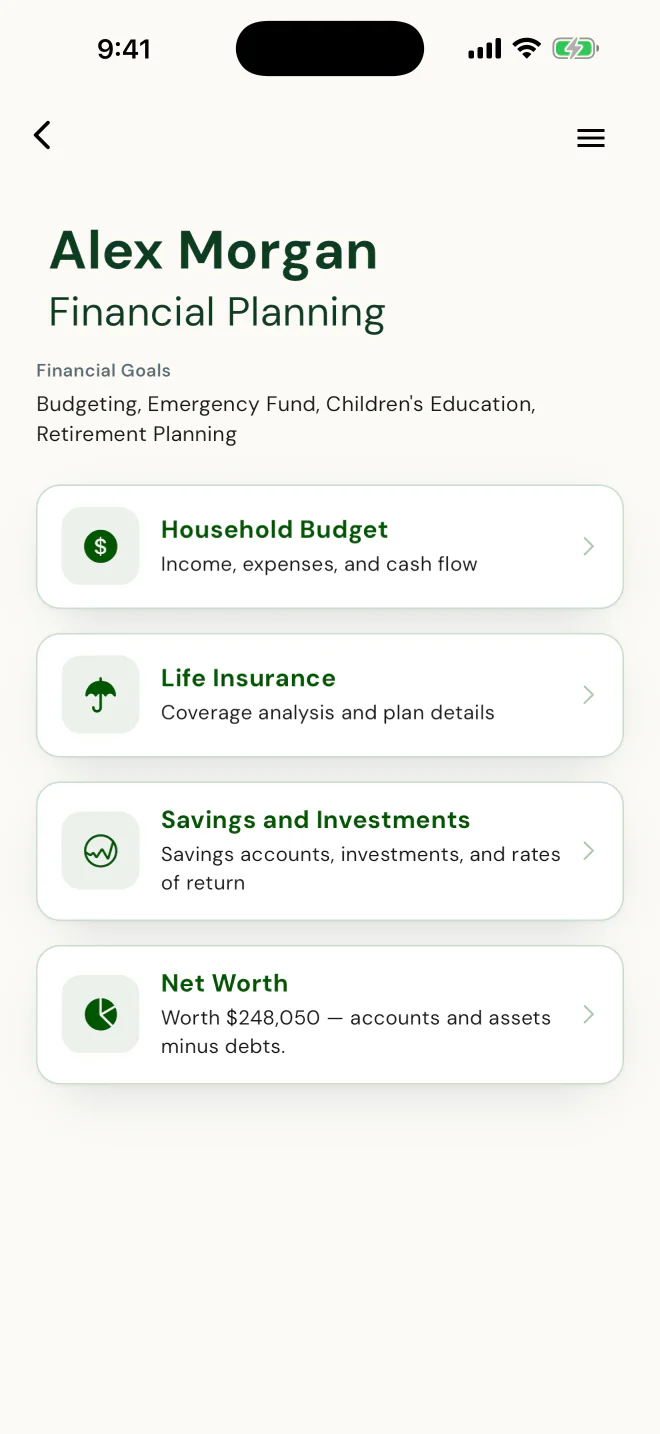
Financial Planning
The pieces you plan from, already filled in.
The household budget, savings, net worth and, for life-licensed advisors, the life insurance analysis. Each one starts from numbers the client entered.
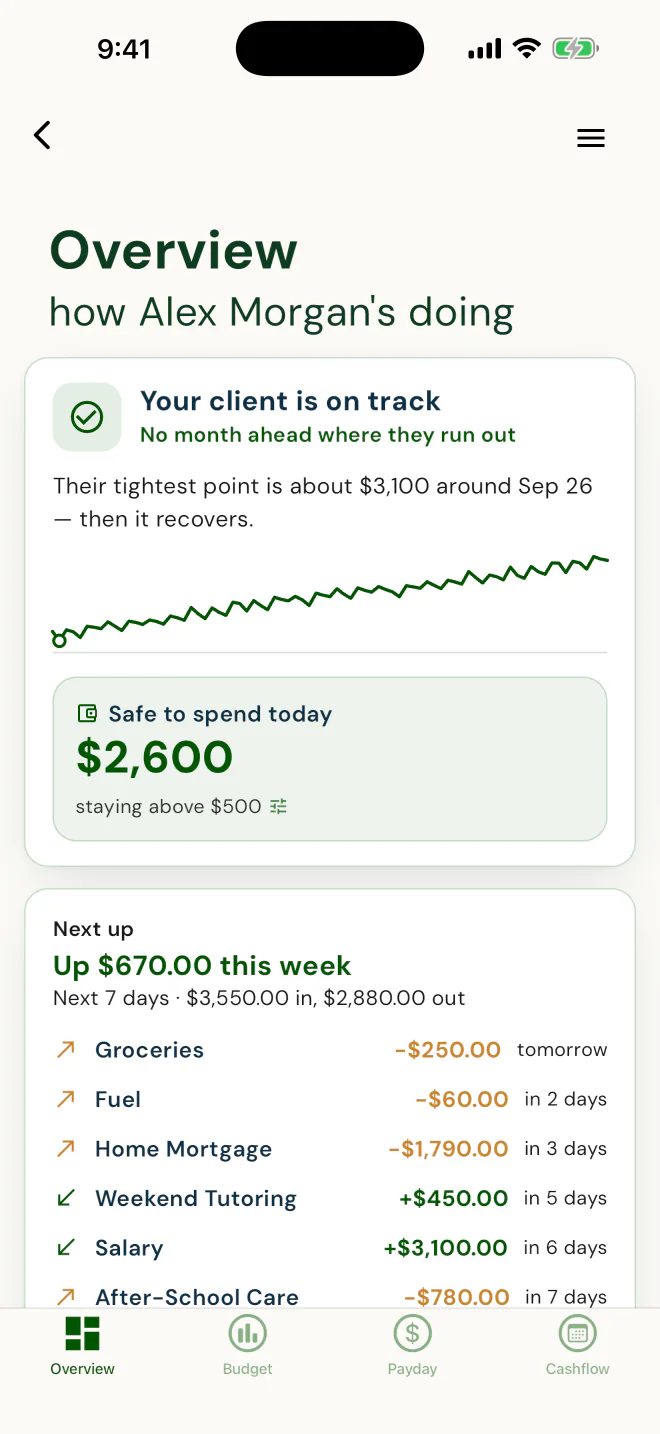
Their Overview, your view
See how they're doing before they call.
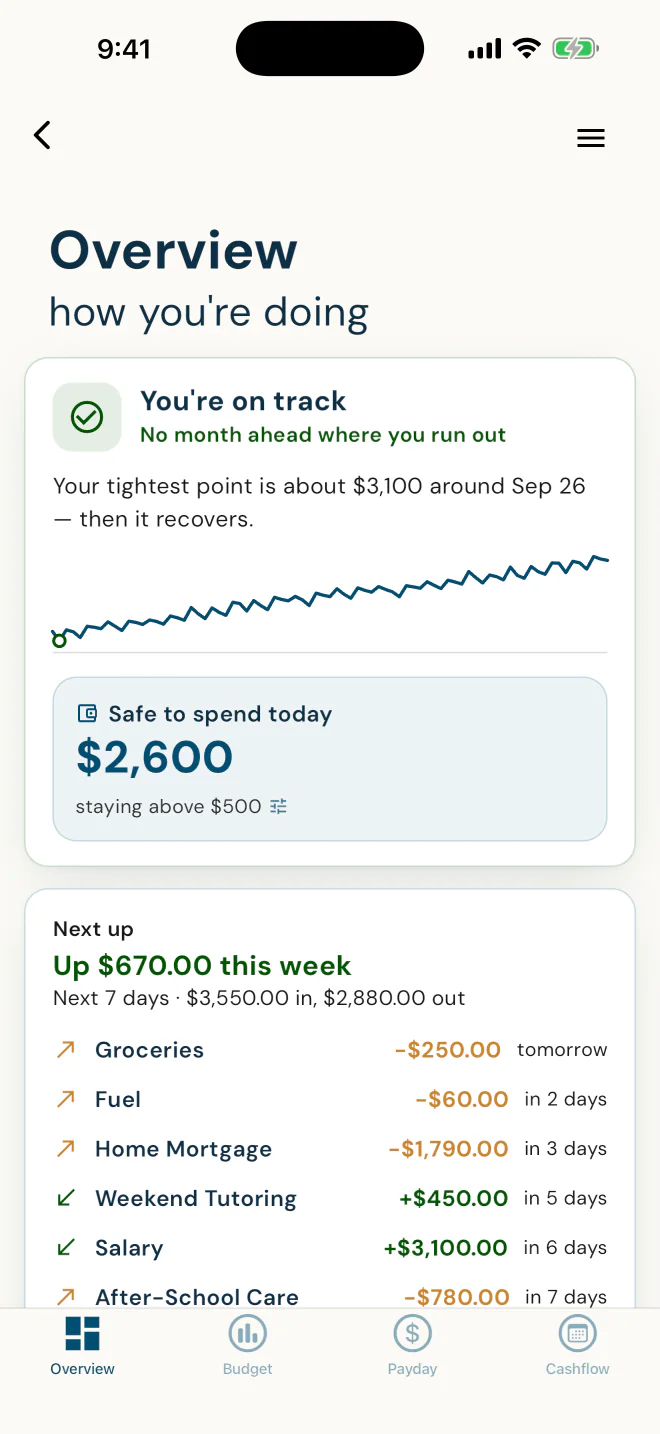
The Overview your client sees: on track or not, their tightest point ahead, and what's safe to spend above their cushion. Current because the client keeps it current.
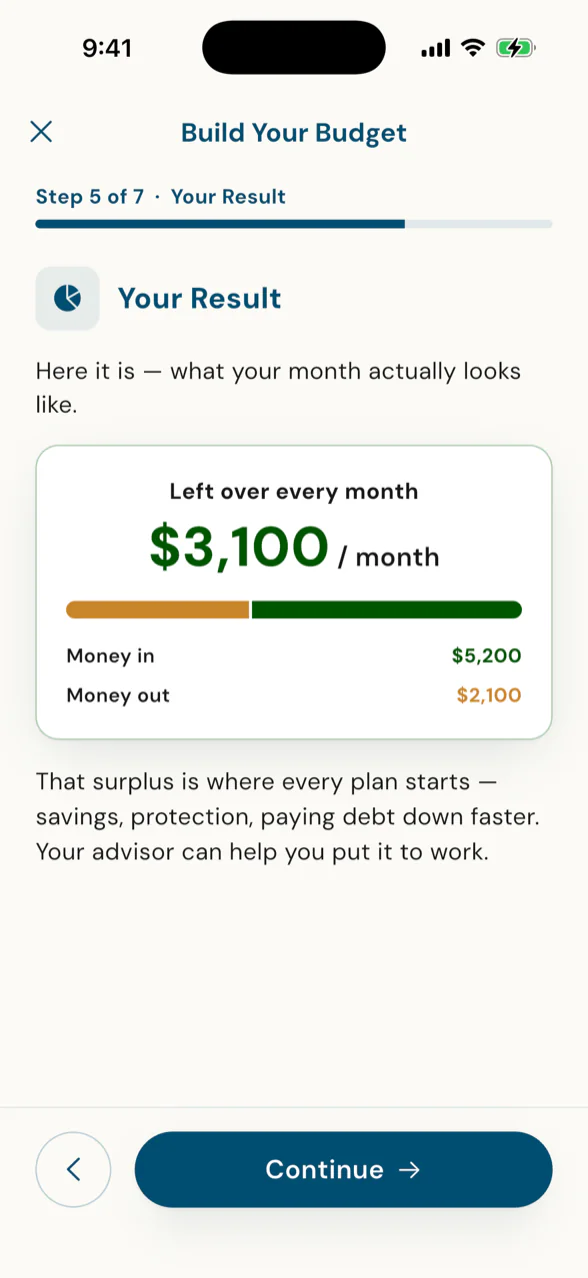
Their budget, already built
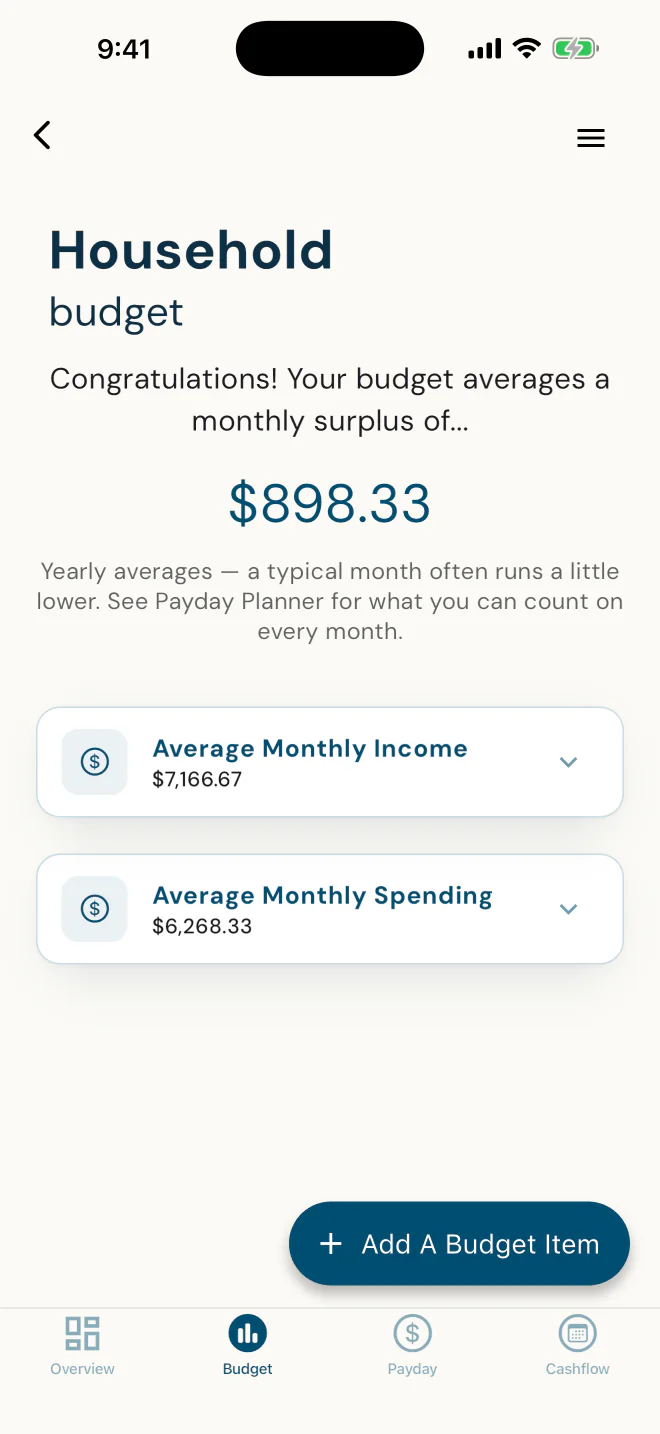
Their surplus: where every plan starts.
Income and spending averaged across the year, entered once, by the client. Your first plan starts here, not from a spreadsheet.
That's the whole loop: you invite, they set up, you review.
Her first client on the app finished setup before she had learned it herself.
Dawn Ewing, an advisor with DFSIN, gave a client the app with one line, "want to try it on this app", before she had learned it herself, and the client set up their household, goals and budget on their own. In Dawn's words:
"She went and did everything faster than I knew how to do it. I was like, I guess I better figure out how to use this."
By the second meeting Dawn had the household, the goals and the numbers in the needs analysis, with the names spelled the way the client spelled them. The budget showed what was left over every month, and the client decided what it was for: $183 a month of insurance to protect their family, and a $100,000 pension that moved into the plan. The client did the work. The app did the first meeting. Dawn did the advising.
Dawn Ewing, Advisor, DFSIN · one client's story, as Dawn tells it
Set up by the clientReady before meeting two
What you stop doing the day you sign up
No spreadsheet. No re-typing their numbers. No more texting back and forth.
PlanTogether replaces the spreadsheet, the paper file and the text-and-email thread of figures with one file the client fills in once and you both work from, and it works alongside the software you already use. Nothing gets keyed twice, and nothing gets lost between meetings.
Today: re-keying and the spreadsheetA budgeting app for them, a planning tool for you, and a spreadsheet in between. You re-key their numbers into your file after every meeting."The Excel spreadsheets, it's very heavy for me to do … and a lot of people don't use spreadsheets." · Dawn Ewing, Advisor, DFSIN
Today: the paper file and the threadFigures arrive by text and email, one at a time, and go stale by the next meeting. "Send me your latest", then a plan rebuilt from whatever came back.
PlanTogetherNumbers entered once, by the client, into the one file both of you work from. You invite and review. Current because the client keeps it current.
Your second reason to sign up
Your clients will love the budgeting app, and that keeps your file current.
Five tools give clients their own reasons to open the app, and each visit keeps the numbers you plan from current, without you asking.
An interactive tour of real app screens. Use the buttons on the phone, or the Next button beside it, to move through it.
Tap here
Take the client app for a spin
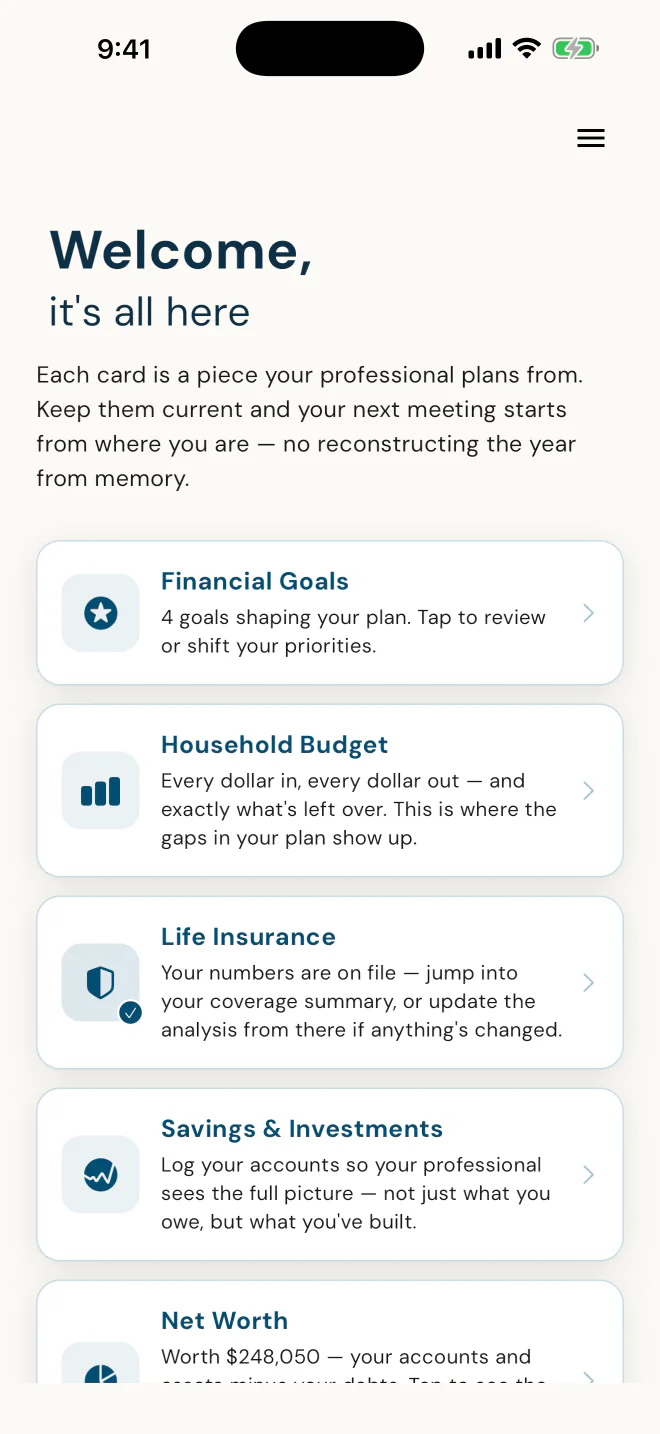
Their home screen
It tells them why to keep it current.
In the app's own words: "Keep them current and your next meeting starts from where you are."
Overview
What's safe to spend today, in one number.
It plays their scheduled bills and paydays forward twelve months, stays above a cushion they choose, and names the tightest point before it arrives. For Alex: "You're on track."
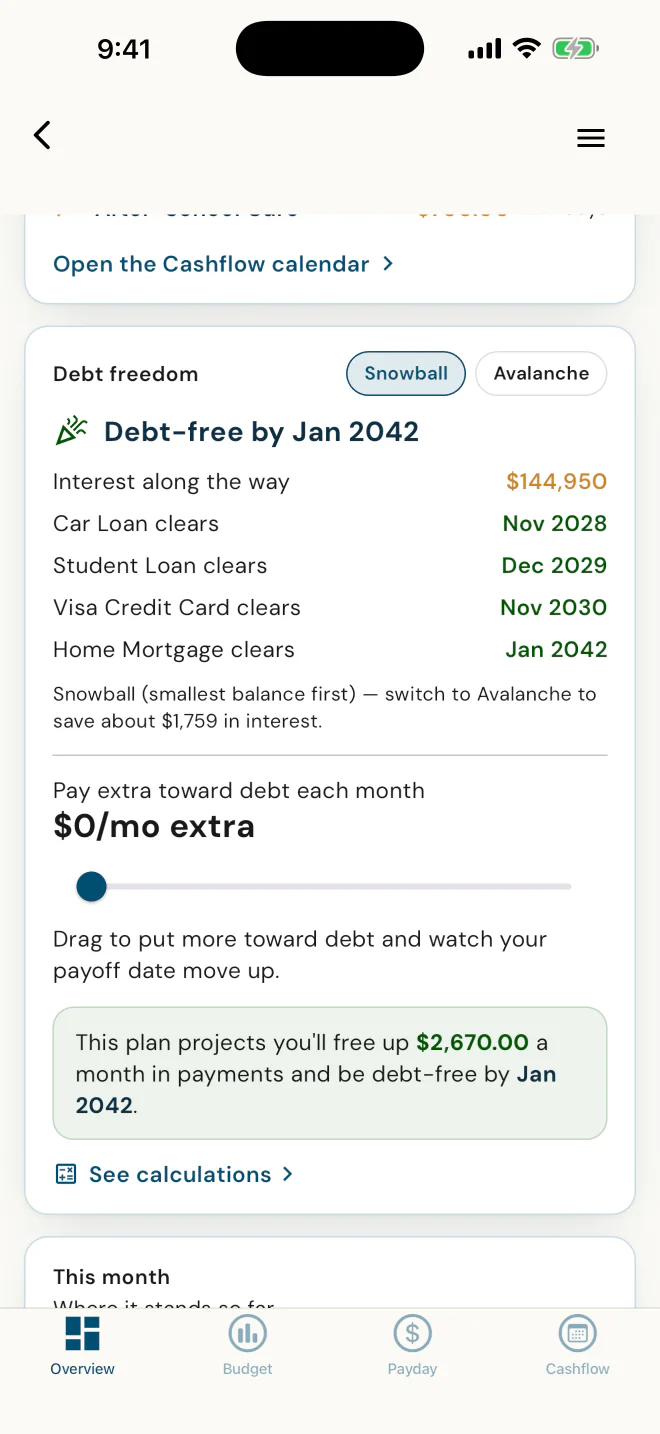
Debt Freedom
A payoff date for every debt.
Snowball or Avalanche, and what switching saves. For Alex, Avalanche would save about $1,759 in interest.
"I believe in the Snowball method, because if we were already making the right math decisions, we wouldn't have debt."
· Dawn Ewing, Advisor, DFSIN
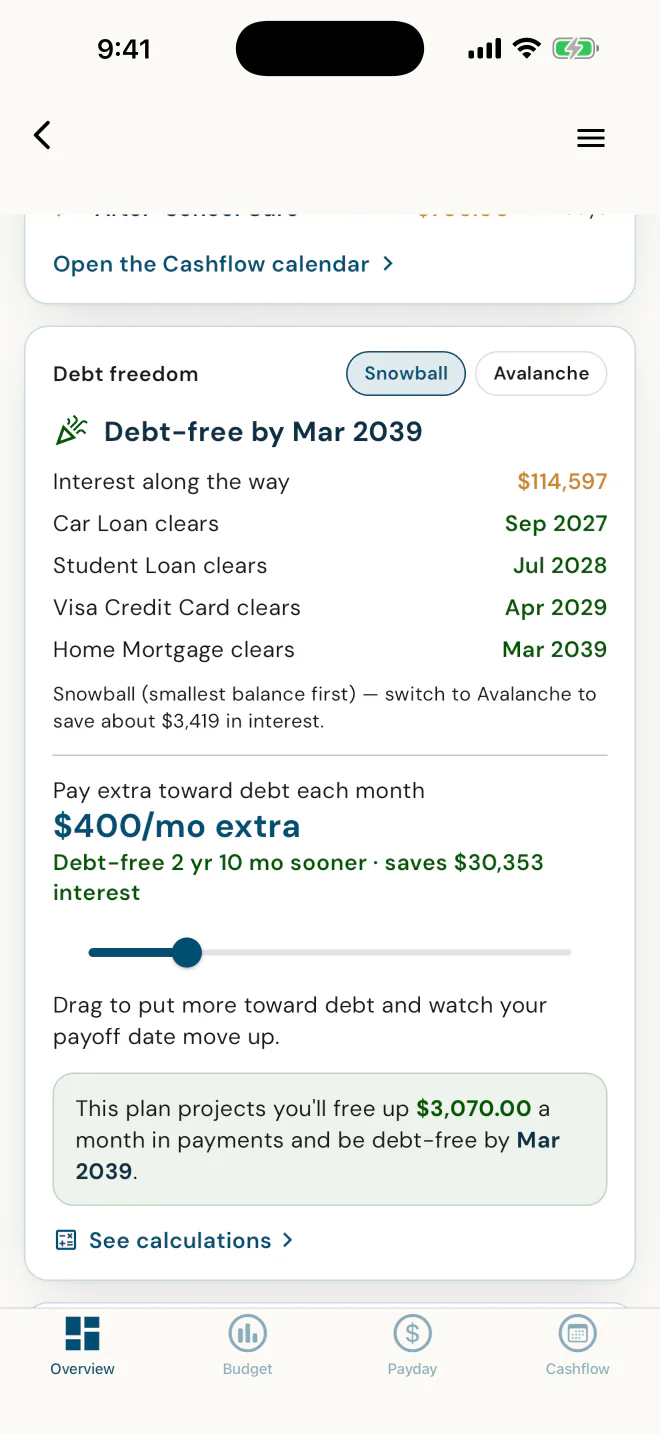
Pay a little extra
Drag the slider, see the new date.
In Alex's plan, $400 a month more moves debt-free from Jan 2042 to Mar 2039. They see what extra buys before a dollar moves.
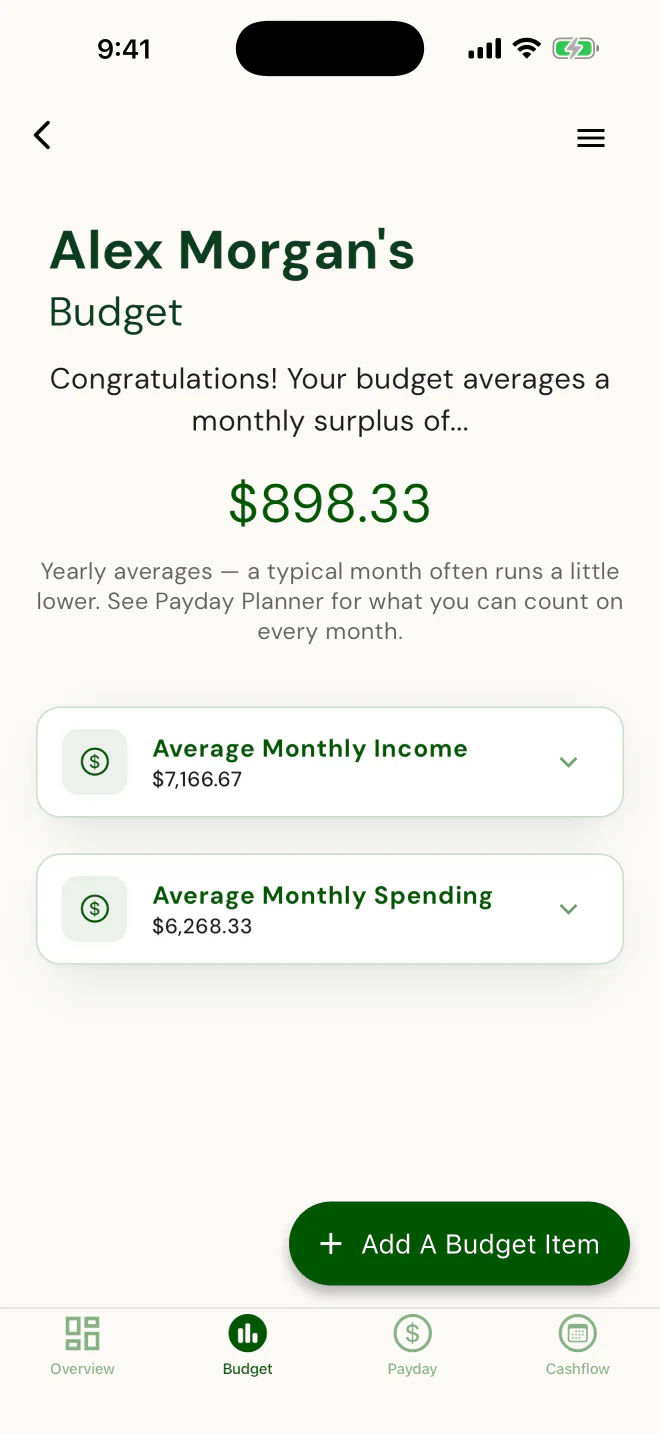
Budget
Money in, money out, and what's left.
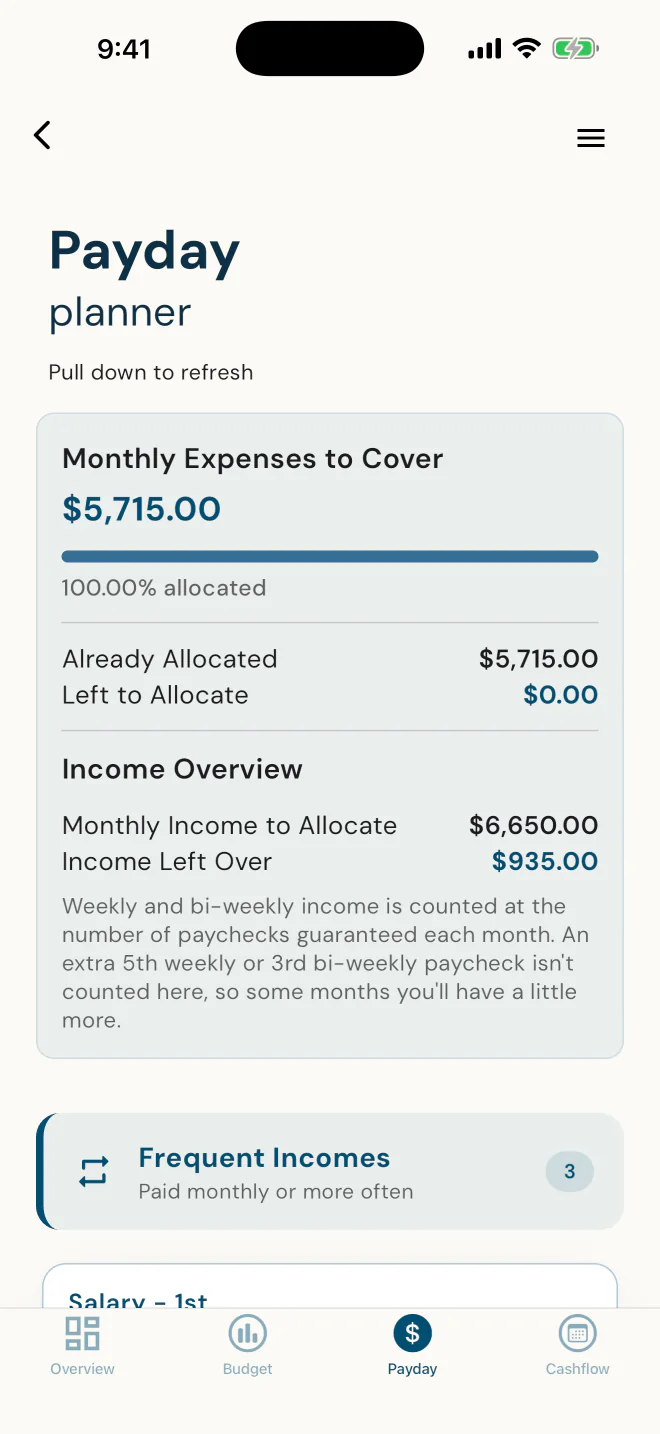
Averaged across the year, so a yearly bill or a three-paycheque month is spread evenly. For what they can count on every month, the Payday Planner is one tap over.
Payday Planner
Every expense gets a payday.
Each bill matched to the paycheque that covers it, down to the dollar. Clients switch it on themselves.
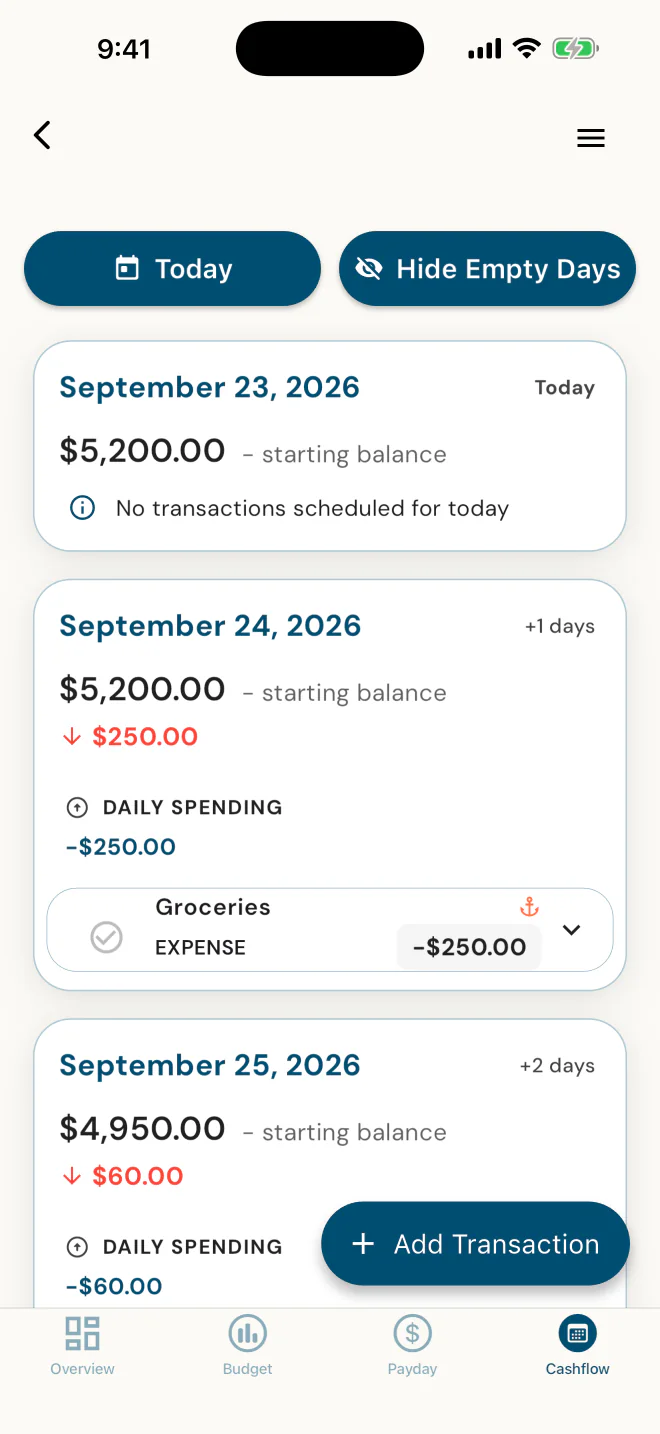
Cashflow Calendar
Every bill and deposit, on a date.
They start from today's balance, put each bill and deposit on its date, and confirm each one as it happens, so the calendar matches real life. Clients switch it on themselves.
Now see what Alex's numbers look like from your side.
30 seconds, no sound.
Watch the full series
: 10 short videos your clients can follow.
The client's home screen says it for us: "Each card is a piece your advisor plans from. Keep them current and your next meeting starts from where you are - no reconstructing the year from memory." Their budget is a projection of the same financial data your life-insurance needs analysis and net worth are built from. Maintaining one is maintaining the other. It is current because the client keeps it current.
What one advisor and her clients say after the setup.
One advisor, Dawn Ewing of DFSIN, and her clients as she tells it, quoted with her permission from a recorded review of the app.
A paper person, on her phone
"I really love paper, but I keep losing my papers. Now it's just easier because it's on my phone."
AA client of Dawn'sas Dawn tells it
Ready before the second meeting
"She filled everything out on the app. So I knew how to spell their names and had everything in our financial needs analysis before our second meeting, which was super helpful."
DDawn EwingAdvisor, DFSIN
Clients bring their friends
"The app is a great way to attract new clients."
DDawn Ewingon a client's friend who had never worked with an advisor, sent her way by the client and asked to try the app
Not a life-insurance advisor?
Accountants, bookkeepers, money coaches, and mortgage and real estate agents invite clients too.
Tax preparers too. Same four fields, same budgeting app, and the figures you see are ones your client has looked at. The compliance modules are for Canadian life-licensed advisors.
The numbers your clients entered also write the compliance file.
For Canadian advisors, the client's self-onboarding is what lets the Fact Find and the compliance file write themselves: the Fact Find generates from the data the client entered and keeps current, and the Advisor Disclosure builds from your one-time profile. Two named modules, Canada only. Client-Level Compliance runs on every client file. Sale-Level Compliance runs on every life sale.
Client-Level ComplianceSale-Level Compliance
Client-Level Compliance
It already knows what's missing.
Your dashboard opens on a To-Do, "N client files need a bit of work", with the exact forms each file is missing, so you don't open a file to find out whether it's a problem.
Generated, not typed. The Fact Find from the client's own data, the Advisor Disclosure from your profile, Privacy Consent in the wording for the client's jurisdiction. You preview, get it signed, and record it on file.
A Fact Find that stays alive. The client confirms it, and it re-opens on a material change: "Since you last confirmed", or "Nothing has changed".
Rules for every province and territory. Built from 155 primary regulatory sources - CLHIA, CCIR/CISRO and all 13 provincial and territorial regulators, not secondary summaries. Covers every province and territory, including Quebec's AMF Notice of Replacement.
Signed, dated, on record. E-signature built in at no extra cost on the Compliance plan, or paper with the copy recorded on file. Seven-year retention with a disposal audit, so "show me your records" is a short conversation.
Client-Level Compliance keeps every file audit-ready. When one of those files becomes a life sale, Sale-Level Compliance takes over.
Sale-Level Compliance
Every life sale, in the sequence auditors check for.
For Canadian advisors, Client-Level Compliance watches every client file - disclosure, privacy consent, fact find confirmation, needs analysis, document retention - and Sale-Level Compliance gates each life sale in the sequence auditors check for: needs analysis, a reason-why letter or replacement paperwork (including the Quebec AMF notice), and the policy delivery receipt - every step dated, signed copies on record, in every province and territory. A life sale can't start until the client-level foundation forms are signed.
PlanTogether bills you, not them. If you decide to charge a client for budget access, you set that up with them yourself, outside the app. Name one price, or a different number for every client at your table.
If you price it, here's the math
1You subscribe on the tier that fits your practice. PlanTogether bills you, not your clients.
2If you decide to charge for budget access, set your price with each client, outside the app. Say $29 a year.
3Two dozen clients at $29 a year is $696, more than a year of Starter or Planner.
✓Every client after that is margin, yours to keep.
Charge or not, it's the connected one
The budgeting apps your clients might pick up on their own don't feed the plan your client is building with you. This one lives inside it. Every number the client keeps current in the budgeting app is a number your plan already has.
Not another budgeting app: the connected one.
Pricing
Start at $0. Pay when your practice grows past 5 clients.
Your first 5 clients are on us, and your clients don't pay for the app. Pick the plan that matches how much of your practice you want the app to carry.
Other financial professionals: accountants, bookkeepers, tax preparers, money coaches, real estate agents, and advisors licensed for mutual funds, securities or mortgages.
For life-insurance advisors
SetUp
The complete app, your first 5 clients on us.
$0/month
$0 for you. Clients don't pay for the app.
Budgeting app, planning, insurance and compliance: everything except sending documents for e-signature
You plus your first 5 clients who accept your invite
No credit card, no trial clock
Past 5? New client cards wait until you pick a plan.
Scale past 5, with the full budgeting app for every client.
$29/month
Every client past your first 5
The full budgeting app: At a glance, Debt Freedom, Household Budget, Payday Planner and Cashflow CalendarBudget Access on for every client, or client by client.
Clients don't pay for the app. If you decide to charge a client for budget access, you set that up with them yourself, outside the app.
Scale past 5, with the full budgeting app and the money picture for every client.
$39/month
Every client past your first 5
The full budgeting app: At a glance, Debt Freedom, Household Budget, Payday Planner and Cashflow CalendarBudget Access on for every client, or client by client.
Savings and investment balances, and net worth
Clients don't pay for the app. If you decide to charge a client for budget access, you set that up with them yourself, outside the app.
The full app is live today, and you'd be a founding advisor.
PlanTogether is live on iOS and Android, every screen on this page is real, and the advisors joining today are founding advisors with a direct line to the founder.
Why we built it
Solo and small-team advisors have a planning platform they like, and no client app to hand their clients. So the "portal" becomes a spreadsheet, a file drive and an email thread, and the plan goes stale the day the meeting ends. PlanTogether by MyFinancialApps is the budgeting app your clients set up themselves, so the file you plan from is current without you asking.
MFAFrom the founderMyFinancialApps, LLC
Where we are right now
Every screen on this page is a real screenshot of the live app: the client budgeting app, financial planning, the life-insurance analysis, and both compliance modules for Canadian advisors, all shipping today.
NOWBuild statusSeptember 2026
Become a founding advisor
Your first five clients are on us. As you grow you get a direct line to the founder and real input on the roadmap. Set up your profile in about two minutes and invite one client to see the setup happen from their side.
YOUFounding advisor inviteOpen now
Questions
PlanTogether, in plain terms.
What is PlanTogether?
PlanTogether is a financial-planning app for life-insurance advisors and other financial professionals, such as accountants, bookkeepers, tax preparers, money coaches, and mortgage and real estate agents, and their clients: clients get their own budgeting app on iOS and Android, and Canadian life-licensed advisors get two named compliance modules - Client-Level Compliance and Sale-Level Compliance. Clients enter their own household, goals and budget once, through a guided app, so the advisor's work is inviting and reviewing, and the plan stays current because the client keeps it current.
Who is PlanTogether for?
PlanTogether is built for solo and small-team life-insurance advisors in Canada and the United States, for accountants, bookkeepers, tax preparers, money coaches, and mortgage and real estate agents, and for the clients they serve. Advisors use it to have clients enter and maintain their own household data, goals and budget, and Canadian life-licensed advisors also use it to keep audit-ready compliance files on every client and every life sale. Clients use it as their own budgeting app between meetings.
What does PlanTogether cost?
Clients don't pay for the app. PlanTogether bills the advisor, and an advisor who decides to charge a client for budget access sets that up with them, outside the app. Advisors start on the SetUp plan at $0 per month, with everything except sending documents for e-signature and their first 5 clients on us, and move to Starter ($29), Planner ($49) or Compliance ($79, Canada only) when their practice grows past it. Other financial professionals, such as accountants and bookkeepers, move to Essentials ($39). Paid plans replace one another - never stacked. Full details are on the
pricing page.
Is PlanTogether available in the United States?
Yes. PlanTogether works in Canada and the United States: clients in both countries get the same budgeting app on iOS and Android, and advisors in both countries invite clients, review their files and plan from the same current numbers. The two compliance modules, Client-Level Compliance and Sale-Level Compliance, are built for Canada only, on per-jurisdiction rules for every province and territory.
Invite one client. Watch the setup happen without you.
Four fields to invite; your client enters their household, goals and budget in about five minutes each. Your first 5 clients are on us, no credit card.